
Small Business Reservation System: A Practical 2026 Guide
What if the booking problem isn’t your calendar, but everything that happens before and after someone picks a time? A reservation system for small business should do more than list open slots. It should help keep inquiries, confirmations, and customer details from slipping through scattered channels. If you’re juggling calls, messages, and online requests, you’re right to want a simpler way to track the work.
The right system depends on how customers book and how your team handles each request. This guide will help you map the tasks you need to manage, compare options using practical criteria, and choose a manageable next step. We’ll look beyond feature lists to the everyday workflow, from the first inquiry to the confirmed reservation, and how your setup can grow with the business.
Key Takeaways
- Choose a reservation system for small business based on how customers book and how your team handles each request, not on the length of its feature list.
- Map booking types, channels, staff responsibilities, and follow-up before comparing options.
- Prioritize a clear booking path for customers and a manageable view of reservations for your team.
- Connecting booking requests with lead follow-up can help keep customer conversations moving.
What a Reservation System for a Small Business Should Handle
A reservation system receives, organizes, and manages customer bookings from the first request through confirmation. It gives staff a consistent way to see what’s been requested, what’s confirmed, and what still needs follow-up. A calendar shows when something is scheduled; a reservation system helps manage the customer request and the work needed to turn it into a booking.
That distinction matters. A calendar may show an open time, but it may not capture a phone inquiry, record what the customer needs, or show who is responsible for responding. A Computer Reservation System has a broader history of organizing reservations. For a small business, the practical test is whether each request stays visible and has a clear next step.
Reservations, appointments, and customer inquiries are different jobs
A restaurant may need to manage table requests, party details, and seating times. A service business may schedule appointments around staff availability and the work requested. A consultant may first receive an inquiry, then follow up before setting a meeting. These are related tasks, but they aren’t identical.
Start by mapping the steps: request, required details, assignment, confirmation, and follow-up. If bookings often begin with a phone call, an AI Receptionist for small business can be part of the customer communication workflow, helping handle interactions and booking inquiries. The goal is fewer requests lost between channels and a clearer handoff from inquiry to reservation.
How to Choose a Reservation System for Your Small Business
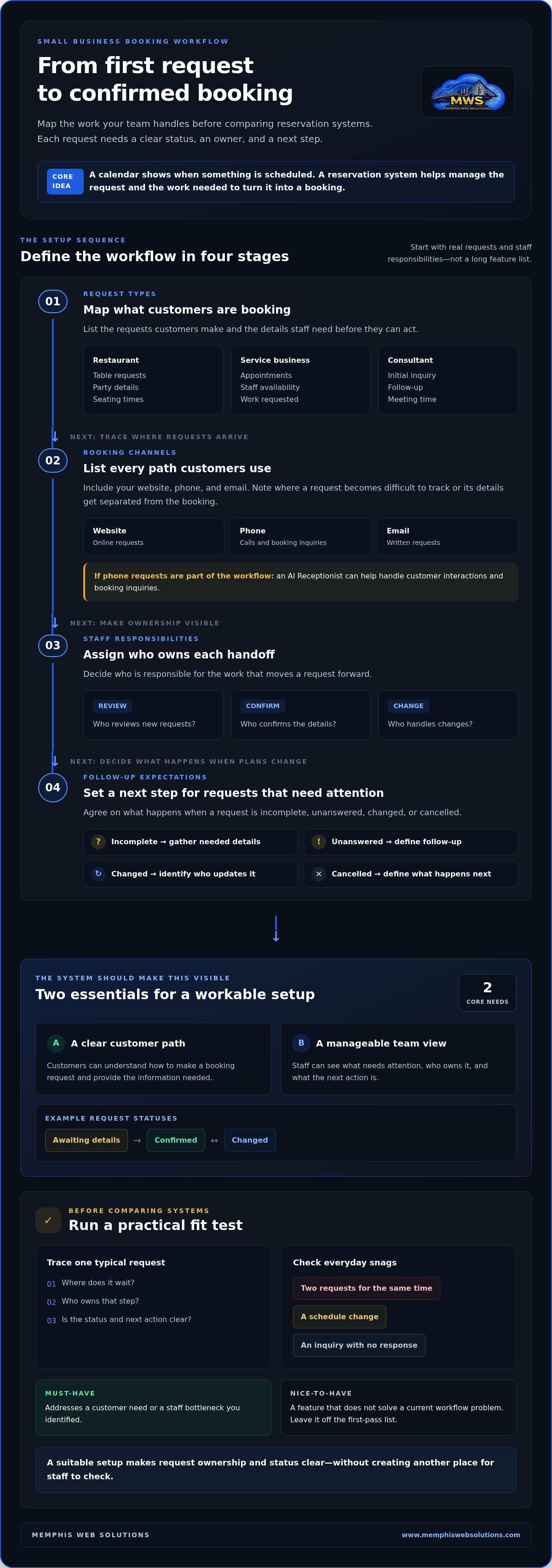
Start with the work your team needs the system to handle, not a list of impressive features. A reservation system for small business should make booking clearer for customers and easier to manage internally. Use this sequence to define what “better” looks like:
- Map booking types. List what customers request and the information staff need to act on each request.
- List booking channels. Include every path customers use, such as your website, phone, or email. Note where requests become difficult to track.
- Assign staff responsibilities. Decide who reviews new requests, confirms details, and handles changes.
- Set follow-up expectations. Decide what happens when a request is incomplete, unanswered, changed, or cancelled.
Then focus on two essentials: a booking path customers can understand and an internal view that helps staff see what needs attention. For example, agree on simple request statuses such as “awaiting details,” “confirmed,” and “changed.” Add other capabilities only when they solve a real workflow problem.
A simple fit test before choosing a system
Trace a typical request from its starting point to the next action. Where does it wait? Who owns that step? Test everyday snags, too: two requests for the same time, a schedule change, and an inquiry that hasn’t received a response. A suitable setup should make ownership and status clear, rather than creating another place for staff to check.
Separate must-haves from nice-to-haves. If a feature doesn’t address a customer need or a staff bottleneck you’ve identified, leave it off the first-pass list. That keeps comparisons grounded in your operation, not software marketing.
Once you’ve mapped the gaps, explore practical business automation as one way to connect booking tasks with the wider customer workflow.
Connect Reservations with Lead Handling in a Memphis Small Business
A booking request is often the start of a customer conversation, not just a time slot to fill. Someone may call with a question, send a website inquiry, or ask for an appointment before they know which service fits. If that first contact is separate from the reservation process, staff can lose context or miss the next step.
Consider a home service business receiving an estimate request. The initial contact, the details needed to understand the job, and the staff member responsible for arranging a visit all belong in a clear workflow. Businesses in Memphis, Arlington, Germantown, Collierville, Lakeland, Bartlett, Olive Branch, Southhaven, and Millington can use the same approach: connect the inquiry to the next action instead of treating every booking as an isolated calendar entry.
What to map before improving your booking workflow
Write down three things: how the customer first gets in touch, what information staff need before confirming a reservation, and what action should happen next. For example, a consultation request might need the customer’s preferred time and a brief description of what they need, followed by an assigned staff response. This simple map can reveal where inquiries stall.
Then define how unanswered or incomplete inquiries should be handled. A consistent follow-up process helps the team keep the conversation moving. For more on organizing that first contact, see this AI lead capture guide.
Memphis Web Solutions’ Reservation & Lead Desk automates customer inquiries, bookings, and lead capture as part of a practical communication workflow. It can help make the path from initial question to confirmed booking easier to manage, without adding steps that don’t fit the business.
Once you’ve mapped the handoffs, explore a practical reservation workflow that fits your customer journey.
Make Your Next Booking Improvement Count
Your next move doesn’t need to be a full system overhaul. Choose one point where a customer request tends to stall, then decide what a smoother handoff would look like. That gives you a practical starting point for a reservation system for small business and a clear way to judge whether a change is helping.
Memphis Web Solutions is a veteran-owned and operated small business. Its Reservation & Lead Desk supports inquiry and booking automation, while AI Receptionists and Concierge Systems handle customer interactions 24/7. The right workflow should feel straightforward for customers and manageable for your team.
Start with one improvement, build from what works, and give every booking request a clearer path forward.
Frequently Asked Questions
Can a small business use a reservation system alongside phone bookings?
Yes. Phone bookings can remain part of the process if someone records them consistently alongside online requests. For example, a Memphis-area business might have the person answering calls enter the reservation and note relevant customer preferences. Set a clear rule for who records changes and how staff who need the updated details are notified, so phone requests don’t disappear into separate notes.
Is a reservation system only useful for restaurants?
No. Businesses that schedule customer time or shared resources can benefit, including professionals reserving consultation slots or a local business coordinating use of a meeting space. A business in Bartlett or Collierville can start by identifying what customers need to reserve and how staff keep track of it. A dedicated system makes sense when it solves a real coordination problem.
What happens when a customer changes or cancels a reservation?
The business should record the change, update staff who rely on the booking details, and tell the customer what happens next. For instance, if a customer moves a consultation, the team can note the new time and make sure the person preparing for the meeting sees it. A reservation system can help organize these steps when they’re part of the business’s process.