Integrating Your AI Receptionist with Your CRM: A Pragmatic How-To Guide
An AI receptionist that doesn't talk to your CRM isn't a solution; it's just a high-tech answering machine that creates more work for your team. You likely invested in AI to reclaim your time, but now you're stuck manually copying call notes into a database. We're going to change that by integrating ai receptionist with crm software to turn your phone system into a true business asset. Tech should work for you, not the other way around.
We agree that double data entry is a drain on your productivity. You deserve a system where a call automatically becomes a customer record without you lifting a finger. This guide provides a pragmatic roadmap to stop the "message-taking" cycle and start automating your lead capture. You'll learn how to connect your tools so leads never fall through the cracks again.
We will walk you through the essential steps to sync your data, set up real-time appointment booking, and trigger automated follow-ups. It's time to build a seamless flow from the first ring to a signed contract.
Key Takeaways
- Understand why a disconnected AI is just a glorified voicemail and how a digital handshake turns it into a 24/7 worker.
- Follow a clear, 4-step process for integrating ai receptionist with crm to ensure every caller's details reach your database instantly.
- Identify the specific data points you need to capture to keep your customer records clean and your follow-ups relevant.
- Discover why a unified Integrated Business System prevents the technical friction often caused by bolting on separate software tools.
- Stop wasting hours on manual data entry and start focusing on closing leads that are already synced to your calendar.
What is AI Receptionist CRM Integration and Why Does It Matter?
Integration is the digital handshake between your phone agent and your customer database. It's the difference between a tool that sits on a shelf and a tool that actually works for you. Think of your CRM as your business's memory. If your AI receptionist isn't talking to that memory, it's essentially working in a vacuum. It hears the customer, it takes the notes, but it forgets everything the moment the call ends. Integrating ai receptionist with crm ensures those conversations are remembered and recorded where they belong.
Without this connection, your AI is little more than a fancy voicemail system. It might sound professional, but it still leaves you with a "leaky bucket" problem. In Memphis, where local competition is tight, missing a single follow-up can cost you thousands. If a lead calls and the information doesn't move directly into your sales pipeline, that lead is at risk of falling through the cracks. You don't have time to chase down call logs or transcribe voice-to-text notes. You need a system that acts like a 24/7 employee.
This is where the pragmatic benefit becomes clear. The underlying virtual assistant technology allows the system to identify who is calling and what they need. When integrated, every call automatically creates a new lead or updates an existing record. There are no sticky notes to lose and no manual data entry to dread. It's a seamless handoff from the phone line to your desk.
Native Connectors vs. Custom API Bridges
Most business owners start with native connectors. These are essentially "plug-and-play" options for common software like HubSpot, Zoho, or Salesforce. If your CRM is supported, you can usually link the systems with a few clicks. It's the fastest way to get your data flowing without needing a tech degree. It prioritizes utility and gets you back to running your business.
If you use specialized or older software, you might need a custom API bridge. This often involves using a middleman tool like Zapier to translate data between the two systems. While it takes an extra step, the result is the same: a unified system where your AI and CRM work in tandem. Whether it's native or custom, the goal is to stop the manual work and start automating your growth.
A 4-Step Guide to Integrating Your AI Receptionist
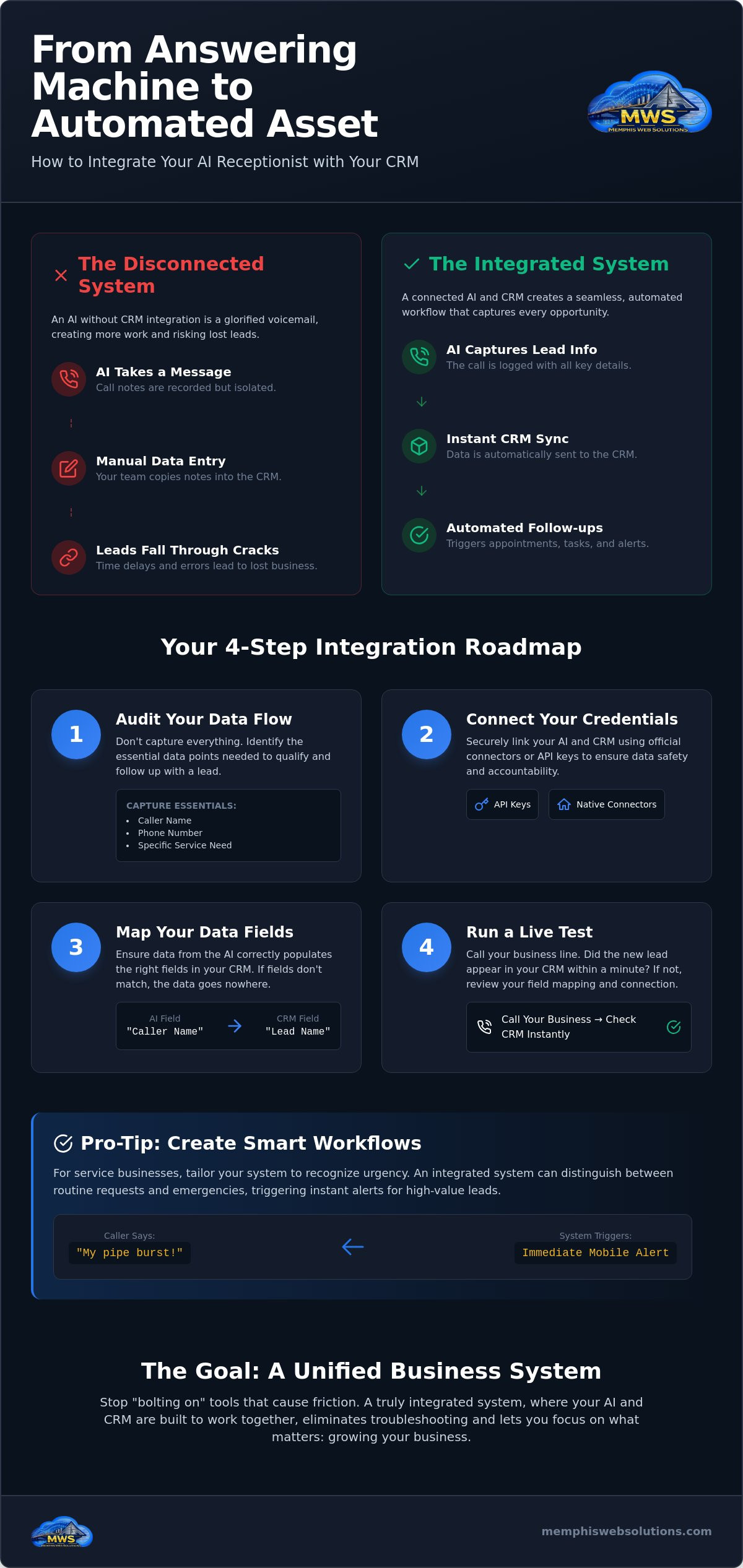
Setting up your system doesn't require a coding degree. It requires a plan. Follow these four steps to ensure integrating ai receptionist with crm software actually delivers on its promise. Start by auditing your data flow. Don't capture every word; capture the essentials. What do you actually need to call them back? Usually, it's just a name, a phone number, and a specific service need.
Next, connect your credentials securely. Use API keys or official app connectors to maintain accountability and data safety. Once connected, you must map your fields. If the "Caller Name" from your phone system isn't mapped to "Lead Name" in your CRM, the data will sit in a void. Finally, run a live test. Call your business line from your personal phone. If the lead record doesn't appear in your CRM within a minute, check your mapping again.
Mapping Data for Local Service Workflows
For Memphis service pros, generic data isn't enough. Your AI Lead Capture System should be smart enough to distinguish between a routine maintenance request and an emergency repair. If a caller mentions a "burst pipe," the system should trigger an immediate alert to your mobile phone. This ensures you're responding to high-value leads before the competition even checks their email. This level of responsiveness is what transforms a tool into a partner.
The Role of the AI Knowledge Assistant
The AI powered knowledge base acts as the brain of your operation. It provides the receptionist with the right answers, which are then logged directly into the CRM. By following a clear Internal Knowledge Base vs. Customer Service Knowledge Base structure, you ensure the AI knows which details are for the customer and which are for your internal records. If you're unsure where to start, an AI Assessment can help identify your specific integration needs.
The Integrated Business System: Avoiding the Integration Headache
Sometimes, integrating ai receptionist with crm software feels like trying to force a square peg into a round hole. If you're "bolting on" a modern AI to a CRM that hasn't been updated since the mid-2010s, you're asking for friction. You might find that data fields don't align or that triggers fail to fire. Instead of saving time, you spend your afternoons troubleshooting broken connections. Tech shouldn't feel like a second job.
Our approach at Memphis Web Solutions focuses on a unified Integrated Business System. In this model, the AI and the CRM aren't just "connected"; they are built to talk to each other from day one. This eliminates the need for complex middleman software or custom coding. You get a single, cohesive environment where a phone call moves naturally into a customer record. It's about utility and common sense.
Switching to a unified system also slashes your overhead. You're looking at one bill, one system to learn, and one point of accountability. If something isn't working, you know exactly who to call. This streamlined setup allows your team to focus on serving customers rather than managing a messy "tech stack" that costs more than it's worth. Efficiency is the ultimate goal.
Accountability in Shelby County
Local business owners in Germantown and Collierville often tell us they're tired of faceless software providers. They want a partner who understands the local market and speaks plainly. As a veteran-owned and operated business, we bring a sense of duty to every implementation. We don't hide behind technical jargon or "hype." We provide tools that work for small teams who need to stay lean and effective.
Ready to see where your current setup stands? Your next step is to take our AI Business Readiness Assessment. It's a straightforward way to determine if your current CRM is ready for an upgrade or if a unified system is the better path forward for your growth.
Stop Managing Tech and Start Capturing Leads
Your phone system should be your hardest-working employee. By integrating ai receptionist with crm software, you move past the message-taking phase and into true business automation. You now have the roadmap to prevent leads from falling through the cracks and the logic to choose a unified system over a patchwork of disconnected tools.
Memphis Web Solutions provides direct, no-nonsense implementation for teams in Memphis, Arlington, and Germantown. As a veteran-owned partner, we prioritize utility and accountability. We don't just hand you a login; we ensure your systems are built to talk to each other so you can focus on your customers.
Take the first step toward a cleaner database and a more responsive business today. You've done the hard work of building your company. It's time to make sure your technology finally keeps up with your ambition.
Frequently Asked Questions
Will an AI receptionist work with my existing CRM like Salesforce or HubSpot?
Yes, modern AI systems are designed to work with major platforms like Salesforce and HubSpot. In early 2026, HubSpot even upgraded its connectors to allow AI models to update records and log activities directly. When integrating ai receptionist with crm tools, you can usually rely on native connectors for a fast setup. If you use specialized local software, we can often build a custom bridge to keep your data flowing.
Do I need to be a 'tech person' to set up the CRM integration?
You don't need a tech degree to manage this. Most integrations use a simple "plug-and-play" method where you just verify your accounts and map your data fields. It's a straightforward process designed for busy business owners. If your current system is older or more complex, that's where a partner like us comes in. We handle the setup so you can stay focused on your actual work.
Can the AI receptionist book appointments directly into my Google or Outlook calendar?
Yes, secure two-way calendar syncing is a standard capability. The AI receptionist checks your live availability in Google or Outlook and books the appointment while the caller is still on the line. It doesn't just ask for a callback time; it puts the meeting on your schedule. This removes the back-and-forth emails and ensures your calendar stays full without you lifting a finger.
What happens if my CRM goes down during a call?
Your AI acts as a reliable backup if your CRM experiences a temporary outage. The system captures the caller's details and stores them securely within the AI platform. Once your CRM is back online, the data can be synced to your records immediately. This safety net is a critical part of integrating ai receptionist with crm systems. It ensures that technical glitches never result in lost business or missed follow-ups.