
Integrated Business Management: A Small Business Guide
What if the first step toward a smoother business day isn’t buying more software, but fixing one customer handoff? When inquiries, bookings, customer details, and staff tasks live in separate tools, follow-up can slip through the cracks. An integrated business management system can bring relevant information and processes together, but it doesn’t have to mean replacing everything at once.
If you’re unsure what needs to connect or which task is worth automating first, start with the friction your team sees every day. This guide explains what an integrated system can include, how to identify processes that need better coordination, and how to choose a practical first step. Focus on customer and staff handoffs so any technology you consider solves a real problem instead of adding another layer of complexity.
Key Takeaways
- An integrated business management system coordinates information and work across tools, unlike a single-purpose booking or payment app.
- Start by mapping a recurring workflow and pinpointing where information or responsibility gets lost.
- Before choosing a solution, define your priorities, including usability, staff roles, reporting, and support.
- Memphis-area businesses can assess whether Memphis Web Solutions’ Integrated Business Systems or AI services fit a specific workflow.
What an Integrated Business Management System Connects
An integrated business management system coordinates tools and processes so information can move along with the work. Instead of keeping customer details, requests, and staff tasks in separate places, it helps create a clearer path from one step to the next. Enterprise Resource Planning (ERP) systems are one example, bringing core business processes together around shared information, as described in this ERP overview.
That’s different from a single-purpose payment, booking, or customer-management tool. One tool may handle a specific task well, while an integrated system considers how that task connects to others. The practical goals are to reduce repeated data entry, clarify handoffs, and help staff respond with relevant information. Integration doesn’t automatically mean every tool is connected. Capabilities depend on the system and on which integrations are confirmed.
Which everyday business workflows can an integrated system support?
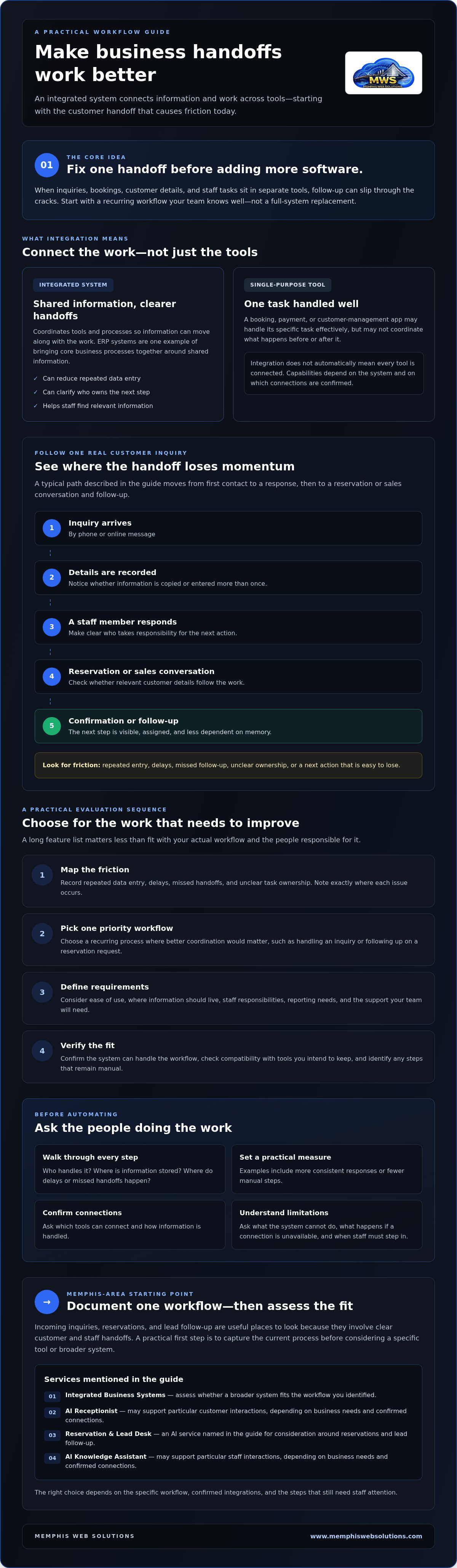
Consider a customer inquiry. It arrives by phone or online message, someone records the details, and a staff member responds. A reservation or sales conversation may follow, along with confirmation or another follow-up. If each handoff depends on someone copying information or remembering the next step, details can get lost.
A coordinated workflow can help staff see what has happened and what still needs attention. Customer service, reservation handling, lead follow-up, and access to internal knowledge may all be relevant parts of the process. An AI Receptionist or AI Knowledge Assistant may support particular customer or staff interactions, depending on the business’s needs and confirmed connections to its existing tools.
Trace one real inquiry from first contact to follow-up. Note where information is entered more than once, who takes responsibility at each step, and where the next action becomes unclear. That map can show which connection would make the work easier, rather than prompting a broad software replacement.
How to Evaluate an Integrated Business Management System
Choose based on the work that needs to improve, not the longest feature list. An integrated business management system should fit your actual workflow and the people responsible for it. You can improve coordination without replacing every tool.
Use this sequence to narrow your options:
- Map the friction: Record repeated data entry, delays, missed handoffs, and unclear task ownership. Be specific about where each issue occurs.
- Pick one priority workflow: Start with a recurring process where better coordination would matter, such as handling an inquiry or following up on a reservation request.
- Define requirements: Consider ease of use, where information should live, staff responsibilities, reporting needs, and the support your team will require.
- Verify fit: Confirm the system can handle the workflow. Check compatibility with the tools you intend to keep and identify any steps that will still be manual.
What should you check before automating a business process?
Ask the staff who do the work to walk through each step. Record who handles it, where the information is stored, and where delays or missed handoffs tend to happen. Then choose a practical measure of success, such as more consistent responses or fewer manual steps. A clear measure makes it easier to judge whether the change is useful.
Before committing, ask providers to confirm which tools can connect, how information is handled, and what the system cannot do. Ask what happens when a connection is unavailable or a request needs staff attention. Get limitations stated plainly. An assumed integration can create more work if it doesn’t behave as expected.
For a business in the Memphis area, documenting one workflow is a useful starting point before discussing options with a local provider. Explore Memphis business systems if you’re considering whether an Integrated Business System or related AI service fits the need you identified.
A Practical First Step for Memphis-Area Businesses
You don’t need a full overhaul to find out whether an integrated business management system could help. Start with a recurring process that causes friction, then write down how it works today. Incoming inquiries, reservations, and lead follow-up are useful places to look because they involve clear customer and staff handoffs.
How can local teams begin without taking on a full overhaul?
Ask the staff who handle the process daily to walk through it from start to finish. Capture the steps, the tools or records involved, who owns each handoff, and where delays or missed follow-up can happen. Keep the notes practical:
- What starts the process, and what should happen next?
- Who responds, books, or follows up?
- Where do staff repeat work or lose track of the next action?
- What would a useful improvement look like, such as clearer ownership or more consistent responses?
With that picture in hand, you can assess whether a specific tool or broader system fits. Memphis Web Solutions offers Integrated Business Systems and AI services, including an AI Receptionist, Reservation & Lead Desk, and AI Knowledge Assistant. These may suit particular customer or staff workflow needs. Confirm capabilities and compatibility with existing tools before assuming they connect.
Businesses in Memphis and nearby communities, including Arlington, Germantown, Collierville, Lakeland, Bartlett, Olive Branch, Southhaven, and Millington, can start by discussing the workflow they documented rather than committing to replace every system. An AI Assessment may also be relevant if you’re considering whether AI fits the process. To review the available options, visit Memphis business systems and AI services.
Start with One Workflow and Build from There
An integrated business management system can help coordinate customer information and staff tasks, but the right starting point is a real operational need. Map one recurring workflow, clarify who owns each handoff, and decide what a useful improvement would look like. Then check whether a system or focused AI service fits before changing the tools your team already relies on.
Memphis Web Solutions serves businesses in Memphis and nearby communities. Its offerings include Integrated Business Systems and AI-driven customer interaction services, which may suit specific workflow needs. Confirm capabilities and compatibility before assuming tools can connect.
Keep the first step manageable. A clear view of one process can help you make a confident choice and improve coordination without adding complexity for its own sake.
Frequently Asked Questions
What is an integrated business management system?
An integrated business management system connects tools and processes so information and tasks can move through related workflows. For example, an inquiry may be captured, assigned for response, connected to a booking, and tracked for follow-up. Unlike a single-purpose payment, booking, or customer-management tool, it coordinates multiple parts of work rather than handling just one task.
How can an integrated business management system help a small business?
It can help a small business coordinate customer details, next steps, and staff responsibilities across connected workflows. For instance, a team may reduce duplicate entry or see more clearly who should respond to a reservation request. The benefit depends on the processes and tools involved. Integration can support coordination, but it doesn’t replace clear ownership or sound procedures.
Can an integrated business management system work with the tools I already use?
It may, but compatibility depends on the specific system and confirmed integrations with your current tools. List the platforms or records your workflow relies on, then ask the provider which can connect and what information will pass between them. Confirm any limitations and data-handling practices, and ask whether manual steps will remain. Don’t assume a connection is available until verified.
How do I choose an integrated business management system?
Choose a system that fits one priority workflow, then assess ease of use, data needs, staff adoption, reporting, and support. Ask how information is handled, who owns each step, and which integrations are confirmed. Start with a manageable process instead of replacing every tool. For local guidance, Memphis Web Solutions serves businesses in Memphis, Arlington, Germantown, Collierville, Lakeland, Bartlett, Olive Branch, Southhaven, and Millington.
To discuss a specific workflow and explore Memphis Web Solutions’ business systems and AI services, visit Memphis Web Solutions.