
Customer Service Knowledge Base vs. Internal Knowledge Base: A Pragmatic Guide
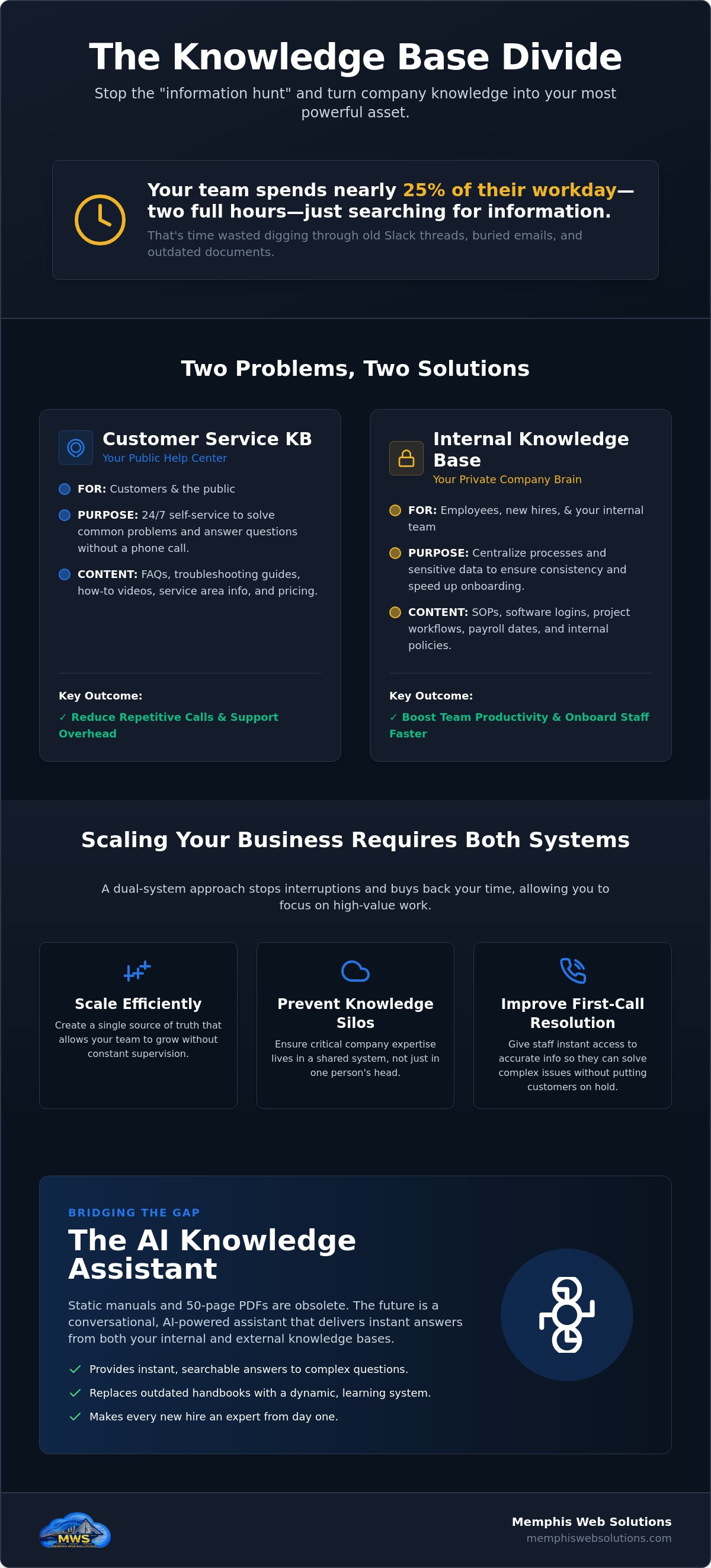
Your employees spend nearly 25% of their workday just searching for information. That is two hours every single day wasted digging through old Slack threads or buried email chains. It is frustrating for your team and even worse for your bottom line. When you are looking to fix this mess, you will likely run into the debate of a customer service knowledge base vs internal knowledge base. One helps your customers find answers at 2 AM without calling your office. The other ensures your new hires here in Memphis don't have to ask the same basic questions ten times during their first week.
You probably already feel that keeping everyone on the same page is the hardest part of scaling a local business. Information lives in people's heads instead of in a searchable system. This guide will show you the critical differences between these two tools and how to use them together to stop the "information hunt" for good. We are breaking down how to centralize your company know-how so you can reduce phone calls, onboard staff faster, and finally turn your expertise into a permanent asset that works even when you aren't in the building.
Key Takeaways
- Understand the core functional split in the customer service knowledge base vs internal knowledge base debate to keep your public help center and private SOPs separate but effective.
- Learn why "answering it twice" is a signal to document the process and how centralizing info stops your staff from wasting hours in old email threads.
- Discover the power of self-service tools that handle basic customer inquiries 24/7 so your team can focus on higher-value tasks.
- See how an AI Knowledge Assistant replaces outdated manuals with a searchable, conversational interface that provides instant answers to complex questions.
- Gain a clear roadmap for scaling your Memphis business by making your internal expertise accessible to every new hire from day one.
Defining the Divide: Customer Service vs. Internal Knowledge Bases
Most business owners think information is just information. It isn't. If you want to scale, you have to separate what the world sees from what your team needs. This is the heart of the customer service knowledge base vs internal knowledge base debate. A knowledge base is simply a centralized repository of data. But how you use it changes everything. One side builds trust by giving customers immediate answers. The other builds speed by giving your employees a shortcut to the right way of doing things. It's about saving talk-time. Every minute your staff spends answering a basic question is a minute they aren't closing a sale.
The Customer Service Knowledge Base (CSKB)
This is your public help center. It's the 24/7 self-service hub where customers go to solve problems without emailing you. It usually holds FAQs, troubleshooting guides, and quick how-to videos. By putting these basics in writing, you significantly reduce the load on your AI Receptionist. Your customers get quick wins. You get fewer repetitive calls. It focuses entirely on clarity and making the customer's life easier.
The Internal Knowledge Base (IKB)
This is the private brain for your business. It's where you store sensitive data like software logins, payroll dates, and specific project workflows. If you are hiring staff in Germantown or Collierville, this tool is your best friend. It allows you to train new hires without constant hand-holding. When the process is documented, the service stays consistent across your entire local team. You aren't just storing files; you are protecting your company's know-how and ensuring that every employee has the same high-quality information at their fingertips.
Why Your Memphis Business Needs Both to Scale Efficiently
Running a business in Memphis is a race against the clock. You can't spend your day acting as a human encyclopedia for your staff or a 24/7 operator for basic questions. If you've answered the same question twice, it belongs in a permanent record. This is the practical reality of managing a customer service knowledge base vs internal knowledge base. One stops the phone from ringing for simple "Where are you located?" queries. The other stops your office manager from being interrupted every five minutes by a confused new hire. You aren't just buying software; you're buying back your own time.
This dual-system approach improves first-call resolution. When a customer calls with a complex issue, your staff needs instant access to the "private brain" of the company to give a fast, accurate answer. If they have to put the customer on hold to go find a manager, you've already lost the battle for efficiency. Having both systems in place ensures that everyone, from the customer to the newest clerk, has exactly what they need to move forward without waiting on you.
Boosting Team Productivity with an IKB
Efficiency dies when your team relies on "shoulder-tapping." When a technician has to stop work to ask about a specific software login or a project workflow, you lose billable hours. Centralizing your SOPs ensures every clerk follows the same playbook without constant supervision. This creates a culture of real accountability. You can finally eliminate the "I didn't know how to do that" excuse because the answer is always one search away. An IKB prevents knowledge silos by ensuring company expertise lives in a shared system rather than just in one person's head.
Reducing Support Overhead with a CSKB
Your time is too expensive to spend on low-value tasks. A public-facing knowledge base filters out leads that aren't a good fit by providing pricing and service area info upfront. When you integrate this with an AI lead capture system, your business stays active in Bartlett and Lakeland even when you're off the clock. It handles the easy stuff so you can focus on the work that actually grows the bottom line. If you're ready to stop the constant interruptions, it might be time for a professional AI assessment of your current systems.
Bridging the Gap: The AI Knowledge Assistant Approach
Static manuals are dead. In 2026, nobody has the time or patience to read a 50-page PDF handbook. If your company info is trapped in a file folder, it's effectively invisible. A modern AI Knowledge Assistant turns those dusty documents into a searchable, talking resource. It acts like your smartest employee who never takes a day off. This technology bridges the gap between a customer service knowledge base vs internal knowledge base by using a single, secure data layer. The system is smart enough to know what a customer in Lakeland is allowed to see and what stays private for your internal team. It's one engine powering two very different experiences.
Consolidating your data this way eliminates the "double-entry" headache. You don't have to update two different systems when your pricing or procedures change. You update the core knowledge once, and the AI handles the rest. It ensures that your public help center and your private SOPs stay perfectly in sync. This isn't about chasing a tech trend; it's about building a utility that actually works for your daily operations.
How to Build a Modern Knowledge Base
- Audit your questions: Look at your sent emails and Slack threads. What do customers and staff ask every single week? These are your first entries.
- Assess your tech: Start an AI business readiness assessment to see where automation can realistically plug into your current workflow.
- Centralize your data: Feed your existing docs and training videos into a secure AI Knowledge Assistant to make them instantly interactive.
The Memphis Web Solutions Difference
We don't do tech-hype. We build practical tools for Shelby County professionals who value their time. As a veteran-owned business, we believe in direct, local accountability. We don't just hand you a login; we build a system that fits the way you actually work. If you're ready to stop the chaos of scattered info and constant interruptions, it's time to get a direct assessment from Memphis Web Solutions. Let's put your business expertise to work so you can focus on growth.
Stop the Chaos and Start Scaling
Scaling a business in Memphis is about efficiency, not just working harder. You've seen how separating your public help center from your private SOPs protects your time and your team's sanity. Static manuals are a relic of the past. By turning your company know-how into a searchable AI resource, you ensure that every technician and customer gets the right answer without waiting on you. Navigating the customer service knowledge base vs internal knowledge base split doesn't have to be a technical nightmare. It's a pragmatic shift toward a more professional, automated operation that values results over complexity.
We don't believe in tech-hype. We believe in utility and real results for Shelby County business owners. As a veteran-owned and operated team, we provide local Memphis support that focuses on your ROI. It's time to get your information out of old email threads and into a system that works. Streamline your business with a Memphis Web Solutions AI Assessment. Let's build a foundation that lets you grow without the constant interruptions. You've built the expertise; now let's make it work for you around the clock.
Frequently Asked Questions
Is it better to have one knowledge base or two separate ones?
You should maintain two separate user experiences but ideally power them from one secure source of truth. Your customers don't need to see your internal payroll schedules or private logins. Keeping the interfaces distinct ensures security while preventing your team from getting distracted by customer-facing fluff. A smart system allows you to tag content as internal or public so you only have to update the core information once.
What is the best internal knowledge base software for a small team in 2026?
The right choice depends on how your team works. Tools like Notion offer great flexibility for document creation, while Guru is effective for teams that need answers pushed to them inside other apps. For many Memphis businesses, the best solution is an AI Knowledge Assistant that connects to your existing files. This avoids the problem where nobody has time to write a manual from scratch.
How much does it cost to set up an AI-powered knowledge base?
Pricing for these systems depends on the volume of your data and how many people need access. Most off-the-shelf software charges a monthly fee per user, while custom setups involve a configuration phase. You should measure the cost against the hours your team currently wastes searching for info. If you save your staff just 30 minutes a day, the system pays for itself almost immediately by reclaiming billable time.
Can an AI Knowledge Assistant answer customer questions automatically?
Yes, it can handle most routine questions without you lifting a finger. When you evaluate a customer service knowledge base vs internal knowledge base, remember that the public side is all about speed for the user. An AI assistant pulls verified answers directly from your documentation to resolve issues in seconds. This keeps your phone lines open for complex, high-value conversations that actually require a human touch.