
Automate Customer Inquiries: A Practical Guide for 2026
What if automation made it easier to reach a person, not harder? When calls and messages arrive while your team is busy, routine questions pile up and pull staff from other work. Learning how to automate customer inquiries starts with a simple distinction: what can be answered consistently, and what needs human judgment.
You don't need to automate every conversation. A useful system handles repeatable intake, gives customers a clear next step, and routes complex or sensitive requests to a person. This guide shows you how to spot good candidates for automation, choose between phone and website chat, and build a practical handoff. You'll also see how to start with one real business need, rather than adding technology for its own sake.
Key Takeaways
- Automate repeatable questions and intake tasks, but don’t confuse answering an inquiry with resolving a complex issue.
- To learn how to automate customer inquiries, start with recurring questions, prepare approved answers, test them, and review how they work.
- Set a clear fallback path so unclear questions, exceptions, and requests needing personal judgment can reach a person.
- Choose a solution based on the business need: phone inquiries, website chat, or combined front-desk support.
What Does It Mean to Automate Customer Inquiries?
Customer inquiry automation uses technology to handle selected, repeatable questions or intake tasks. It can provide approved information, collect the details needed for a request, or guide someone to a next step. The goal isn’t to automate every customer interaction. It’s to handle predictable work consistently, so staff can focus on situations that need judgment.
That distinction matters. Answering a question is not the same as resolving a complex issue. A system might share your business hours or collect an appointment request. But a complaint may require listening, context, and a decision that falls outside a prepared answer. If an automated response sounds confident but misses the real problem, it can leave a customer worse off.
Which Customer Inquiries Are Repetitive, and Which Need a Person?
Start by looking at what customers ask again and again. Questions about business hours or service areas often have clear, stable answers. Appointment requests may also follow a consistent intake process. These can be good candidates for automation when the information is accurate and the next step is clear.
Complaints, unusual exceptions, and sensitive situations call for more care. A customer may need someone to understand the circumstances, make a judgment, or take responsibility for a resolution. Build a path to a person for those moments, and for questions the system can’t answer clearly.
Inquiry automation handles repeatable questions and intake, then hands off unclear, sensitive, or judgment-heavy requests to a person. That boundary is central to how to automate customer inquiries without making service feel impersonal. Faster answers help only when customers can still reach human judgment when their situation calls for it.
How to Automate Customer Inquiries Without Losing the Human Touch
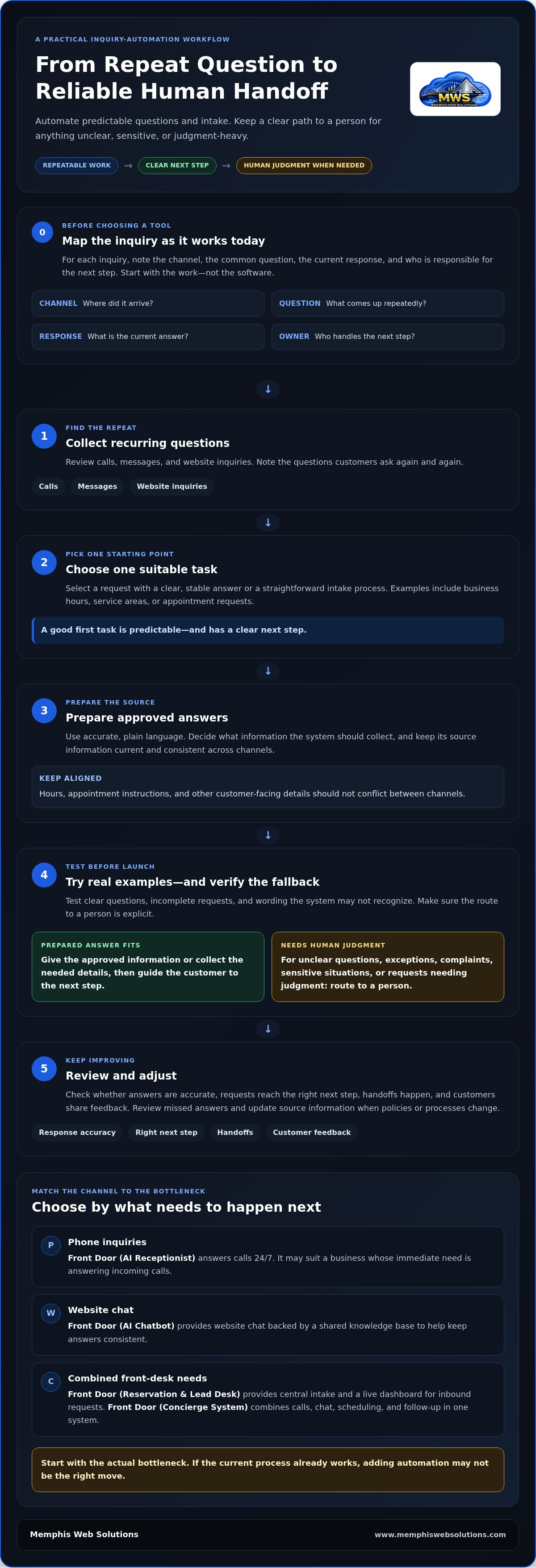
Start with the work, not the software. A simple map of incoming questions helps you see what repeats, where it arrives, and who handles it now. For each inquiry, record the channel, the common question, the current response, and the person responsible. IBM’s Understanding Customer Service Automation offers broader context on how automation can support customer service.
Map the Inquiry Before Choosing an Automation Tool
Keep the source information clear and current. If business hours or appointment instructions differ between channels, automated answers can repeat the inconsistency. Organize inbound requests so staff can see what came in and who owns the next step. A practical answer to how to automate customer inquiries is to begin with one recurring task and a reliable source for its response.
- Collect recurring questions. Review calls, messages, and website inquiries. Note the questions that come up repeatedly.
- Choose one suitable task. Start with a request that has a clear answer or a straightforward intake process.
- Prepare approved answers. Use accurate, plain language and identify what information the system should collect.
- Test real examples. Try clear questions, incomplete requests, and wording the system may not recognize. Confirm the fallback leads to a person.
- Review and adjust. Check response accuracy, whether requests reach the right next step, how often handoffs occur, and what customers say about the experience.
Set the fallback before launch. If a question is unclear, an exception arises, or a request needs personal judgment, make the next step explicit, such as directing the customer to a staff member. Review missed answers and handoffs regularly, and update the source information when policies or processes change. If you’re sorting out the workflow before selecting a tool, business-first technology guidance can help keep the decision tied to the actual need.
Choose a Customer Inquiry Solution by Starting With the Business Problem
Start with the bottleneck, not a product name. Are calls going unanswered, website visitors repeating basic questions, or several front-desk tasks competing for staff attention? The right fit depends on where inquiries arrive and what needs to happen next. If the current process already works, adding automation may not be the right move.
- Phone inquiries: Front Door (AI Receptionist) answers calls 24/7. It may suit a business whose immediate need is answering incoming calls.
- Website chat: Front Door (AI Chatbot) provides website chat backed by a shared knowledge base, helping keep answers consistent. Consider it when visitors need answers through your website.
- Combined front-desk needs: Front Door (Reservation & Lead Desk) provides central intake and a live dashboard for inbound requests. Front Door (Concierge System) combines calls, chat, scheduling, and follow-up in one system. Identify the tasks and handoffs first, then match the solution to that need.
When an AI Receptionist, Chatbot, or Combined Front Desk Fits
Choose a phone-focused option if calls are the main source of missed or repeated inquiries. For website conversations, look at the AI Chatbot and keep its shared knowledge base aligned with the information customers need. If your challenge spans several front-desk needs, assess the process before settling on an option. This is how to automate customer inquiries without assuming one tool fits every channel.
Memphis Web Solutions diagnoses the business issue before recommending technology. A free consultation can cover scope, cost, and sequence, including whether existing tools or process changes are enough. That keeps the decision practical: solve the actual bottleneck, not a hypothetical one. Explore business-first technology planning if you’re weighing a first step.
Make Your First Step a Practical One
If you're deciding how to automate customer inquiries, begin with one point of friction worth fixing. Define what a better experience would look like for both customers and staff. That gives you a grounded starting point, whether the next move is a process adjustment or a larger change. The goal isn’t automation for its own sake. It’s a useful response and a clear way to reach human judgment when needed.
Memphis Web Solutions takes a business-first, vendor-neutral approach to diagnosis. The recommendation may be to use existing tools or make a process change before adding technology. A free consultation can cover the workflow’s scope, cost, and sequence. Memphis-based and veteran-owned, the business serves customers in Memphis, Arlington, Germantown, Collierville, Lakeland, Bartlett, Olive Branch, Southhaven, and Millington, as well as nationwide.
You don’t have to change everything at once. Choose a useful first step and build from there.
Frequently Asked Questions
Can I automate customer inquiries without replacing my staff?
Yes. A practical way to learn how to automate customer inquiries is to assign repeatable intake to a system while staff keep responsibility for advice, decisions, and unusual cases. For example, automation might gather a customer’s preferred appointment time, while a team member handles a request that needs judgment. Start with a task that supports staff expertise rather than replacing it.
What should happen when an automated system cannot answer a customer?
If the system can’t answer, it should avoid guessing and make the next step clear. For example, it can capture the customer’s name, preferred callback method, and a short description of the issue before directing the request to the appropriate staff member. Decide who checks that information and how urgent matters are flagged.
How do I keep automated answers accurate?
Keep automated answers accurate by treating the source information as a controlled business record, not informal notes. If a promotion ends or appointment rules change, update the approved wording before customers encounter the old answer. Assign a staff owner to review edits, and note when a change takes effect. Customer comments can reveal confusing phrasing even when the underlying facts are correct.
Is customer inquiry automation useful for a small business?
It can be useful if routine questions regularly pull people away from core work or incoming requests are hard to track. Compare the time spent repeating answers with the effort of maintaining a reliable process. For businesses in Memphis, Arlington, Germantown, Collierville, Lakeland, Bartlett, Olive Branch, Southhaven, and Millington, assess the specific pressure point before deciding whether a change makes sense.