AI for Small Business: 3-Step Setup Guide
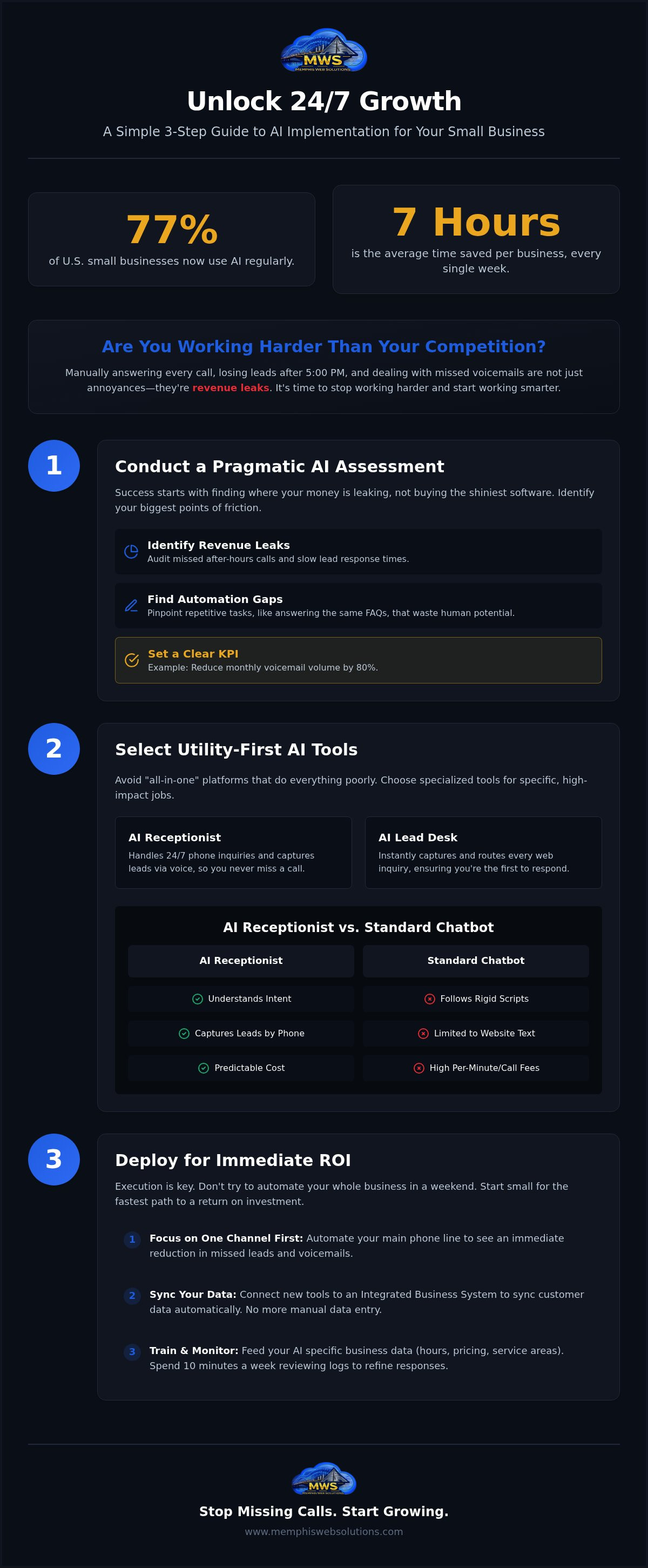
Did you know that 77% of U.S. small businesses are now using AI regularly, saving an average of seven hours every single week? That isn't just tech-hype. It's a fundamental shift in how local services operate. If you're still manually answering every call or losing leads after 5:00 PM, you're working harder than your competition. A practical AI implementation for small business doesn't require a computer science degree or a massive budget. It's about utility, not novelty.
You likely feel the frustration of high receptionist costs or the sting of a missed voicemail from a ready-to-buy customer. It's exhausting. We're going to show you how to deploy high-utility AI tools that capture leads 24/7 and slash your overhead. This guide breaks down the process into a simple three-step setup. We'll walk through a basic assessment, deploy an AI receptionist, and integrate a system that keeps your business running while you sleep.
Key Takeaways
- Identify hidden revenue leaks by auditing missed after-hours calls and slow lead response times.
- Simplify your AI implementation for small business by choosing specialized tools like an AI Receptionist over complex, generic software.
- Focus on automating a single high-friction channel first to secure an immediate return on investment.
- Sync your customer data automatically by connecting new tools to an Integrated Business System.
Step 1: Conduct a Pragmatic AI Business Assessment
Stop guessing where you need help. Success isn't about buying the shiniest software; it's about finding where your money is leaking. A successful AI implementation for small business starts with a cold look at your missed opportunities. Are you losing calls after 5:00 PM? Do leads ghost you because your response time is too slow? These aren't just minor annoyances. They're revenue leaks that directly impact your bottom line.
Evaluate your digital foundation. A slow website or weak SEO presence limits your reach before you even start. Look at your team's daily workload. If they spend hours answering the same five questions about hours or location, you're wasting human potential. An AI Knowledge Assistant can handle these repetitive FAQs, freeing your staff for higher-value work.
Identifying Your Highest-Impact Automation Gaps
Focus on your "Front Desk" first. This is where customer friction is highest and patience is lowest. Before you commit to new software, you need a pragmatic AI business assessment to understand which processes are truly ready for change. It's about utility, not novelty.
Use a pragmatic AI business readiness assessment to rank tasks by their automation potential. Don't automate just to look modern. Set clear KPIs, such as reducing your monthly voicemail volume by 80%. Prioritizing these gaps ensures your AI implementation for small business delivers immediate value rather than adding more noise to your operations.
Step 2: Selecting Utility-First AI Tools for Your Local Business
Don't get distracted by "all-in-one" AI platforms. They usually do everything poorly. For a successful AI implementation for small business, you need specialists. Think of it like hiring. You wouldn't hire a generalist to fix your plumbing; you hire a plumber. Your AI tools should be just as focused.
Prioritize an AI Receptionist. It handles 24/7 phone inquiries while you're on a job or asleep. Pair this with an AI Lead Desk. This ensures every web inquiry is captured and routed instantly. If you aren't the first to respond, you're usually the last. All these tools must plug into your existing website and professional domain. You don't need a total tech overhaul, just better utility. This focused approach makes AI implementation for small business manageable and affordable.
Why an AI Receptionist Beats a Standard Chatbot
Standard chatbots are frustrating for customers. They follow rigid scripts. If a customer deviates, the bot breaks. An AI receptionist for small business understands intent. It listens and reacts like a human would. Voice AI allows you to capture leads over the phone, which is where most local service business actually happens.
Compare the cost-to-utility ratio of AI against traditional answering services like Smith.ai or Ruby. Traditional services charge by the minute or the call. AI provides a steady, predictable presence without the high overhead. Before deploying your AI system, ensure it integrates with your current workflow. If you want to see how these tools fit together, look at our integrated business system options.
Step 3: Deploying Your AI System for Immediate ROI
Execution is where most owners stall. Don't try to automate your whole office in a weekend. Start small. Pick one high-friction channel like your main phone line. This is the fastest path to a successful AI implementation for small business. By automating the first point of contact, you see an immediate reduction in missed leads. Connect these tools to an Integrated Business System. This ensures your customer data syncs automatically across your platform. No more manual data entry. No more lost sticky notes.
Your AI is only as good as the info you give it. Train your AI Knowledge Assistant with your specific business data. This includes your current pricing, exact service areas, and holiday hours. Accurate data makes your AI implementation for small business feel professional and reliable. Don't just set it and forget it. Spend ten minutes every Friday reviewing the logs. Monitor the system to refine responses and ensure lead quality remains high. It's a tool, not a replacement for your oversight.
Scaling with a Local Memphis Automation Partner
Avoid the DIY trap. Spending weeks trying to configure complex APIs is a waste of your time. Working with a business automation consultant in Memphis ensures the job gets done right the first time. Local partners provide a level of accountability that distant SaaS providers simply cannot match. We understand the Memphis market because we live here. Ready to stop missing calls and start growing? Schedule your AI assessment with Memphis Web Solutions today.
Take Control of Your Front Desk
Success doesn't require a massive tech budget or a complex overhaul. It starts with a simple audit of where you're losing money today. By focusing on utility over novelty, a proper AI implementation for small business allows you to capture every lead without adding to your payroll. You've seen the steps: assess your gaps, choose specialized tools like an AI Receptionist, and deploy for immediate results. Stop letting after-hours calls go to voicemail. Start building a system that works as hard as you do.
We bring veteran-owned accountability and local support right here in Shelby County. We don't just sell software; we help you plug the leaks in your business. It's time to trade the tech-hype for actual results and 24/7 lead capture.
Your business deserves a front desk that never sleeps. Let's get to work.
Frequently Asked Questions
How much does AI implementation cost for a small business?
AI implementation for small business costs vary depending on the complexity of your workflow. Most setups involve a one-time configuration fee followed by a monthly subscription for the AI platform. Instead of high hourly rates for human receptionists, you pay for a system that never takes a day off. It's a predictable expense that scales alongside your lead volume.
Will AI replace my human staff or just help them?
AI is built to assist your team, not replace them. Reports show that business owners using these tools save an average of seven hours every week. By automating repetitive tasks like booking and FAQs, your staff can focus on high-value work that requires a human touch. It's about increasing your output without doubling your payroll or your stress.
Do I need a new phone number to use an AI receptionist?
You can keep your existing business number. Most AI receptionists work through simple call forwarding. When you're on another line or the office is closed, the system picks up automatically. This maintains your local Memphis presence while ensuring no lead goes to voicemail. You get the benefits of 24/7 automation without the hassle of updating your marketing materials.
How long does it take to set up an automated lead capture system?
A standard setup typically takes one to two weeks to fully deploy. This includes the initial assessment and the time needed to train the AI on your specific services and pricing. We focus on a modular approach so you can start capturing leads immediately. Complex integrations with local CRMs might add a few days to the timeline for testing.